
Guide
Install the 3X-UI panel without Linux commands
If you have a VPS and do not want to fight scripts, VPS to VPN does it from Windows or Android: connect, run Full Deploy, and 3X-UI Sanaei plus Xray come up.
Who this page is for
- You bought a VPS and only need a panel
- You are tired of manual 3X-UI install and Linux errors
- You want to continue from a phone or Windows, with no terminal
How it works
Get a clean Ubuntu 22 or 24 VPS first. You need the IP, SSH username, password, and port. Two GB RAM, two CPU cores, and 20 GB disk is the usual minimum.
Download the Windows zip or the Android apk from the official download page on foxnext.net. Install the program, then open it.
- Open Center Server Setup and save the VPS login. Do not leave spaces in IP, user, password, or port.
- Use SSH Connect. Wait until the connection mark is on. If it fails, fix SSH before you continue.
- Run Full Deploy. Watch the log. When it shows Successful, the panel is on the server.
- Open Panel Login Info. Copy the panel URL, username, and password. Paste the URL in a browser and sign in.
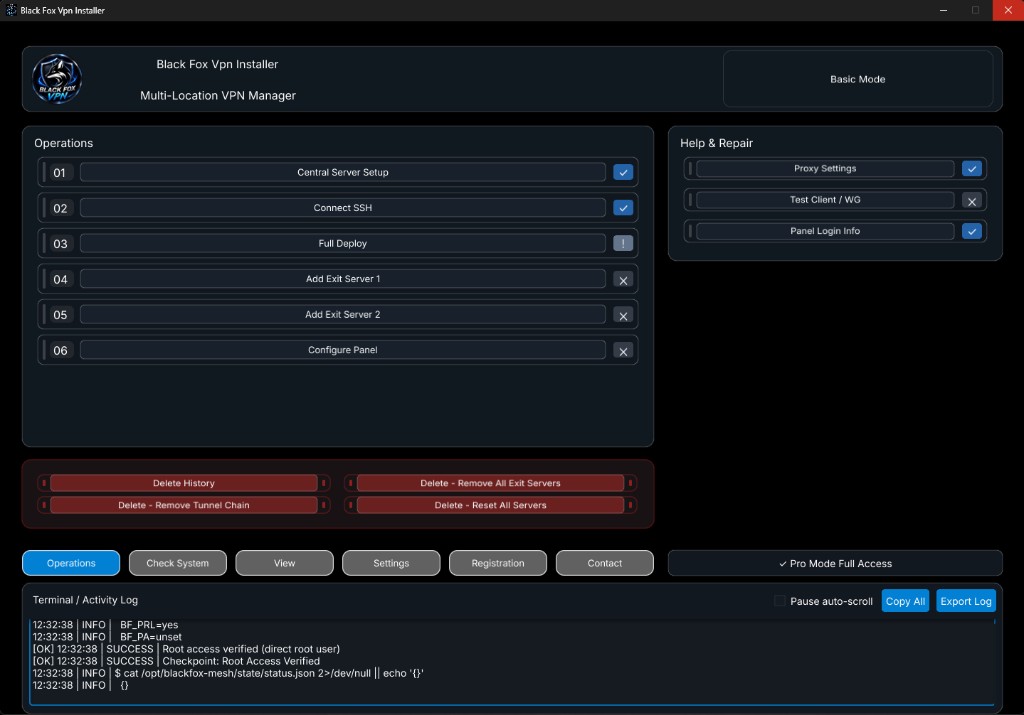
On Android, turn the phone VPN off while you set the center server, connect SSH, and run Full Deploy. On Windows the program handles that itself.
If you use Basic mode, add Exit servers after the panel is up. Save Exit 1, wait for Successful, then do Exit 2 the same way. On Android keep the phone VPN on when you add exit servers.
Versus a manual install
Manual: You run the script and panel setup in a terminal. You need Linux. You fix SSH and port errors yourself.
With VPS to VPN: One-shot Full Deploy from Windows or Android. The path is inside the app. Higher plans also add tunnels, CDN, and link monitor.
More detail: manual or auto. If install stops: common errors.
Common questions
Do I need Linux?
Not for day-to-day use. The app installs on Ubuntu from Windows or Android.
Which VPS do I need?
A clean Ubuntu 22 or 24 VPS with SSH access.
Where is a safe download?
Official downloads are only on foxnext.net.
How is this different from a one-line 3X-UI install?
The one-line method needs a terminal. This path runs Full Deploy from Windows or Android, and higher plans add tunnels and CDN.
Official files: VPS to VPN-Setup.zip, VPS to VPN-Android.apk, and Black-Fox-Config-Builder.apk.
Full install · Manual vs auto · Full Deploy · Errors · Tutorials · Download
Black Fox Group makes VPS to VPN. Official downloads are only on foxnext.net. Full Deploy installs 3X-UI Sanaei on Ubuntu 22 or 24 with no Linux commands.